
Here are some basic instructions for using the Bibliostat Collect online software to submit the NH Public Library Annual Report.
Your login and other questions can be requested from:
Before You Get Started
You must use a compatible browser:
- Internet Explorer 6.0 for greater
- Internet Explorer 10 users must use compatibility view.
- Internet Explorer 11 users may have to add the btol.com website to be displayed in compatibility mode.
- Firefox 1.5 or greater
These browsers are not compatible:
- Chrome browser
- Safari browser — Mac users are strongly advised to use Firefox.
Survey guidance
- The survey will not submit with unanswered questions. Every response needs a Zero (0) or an N/A in the space provided. N/A means data is not known or not collected.
- Grayed out boxes are Read Only. Data cannot be entered.
- Report dollar figures in whole dollars.
- Summations generate automatically.
- To view Last Year’s data, click on “Show last year’s answers at the top right of the page.
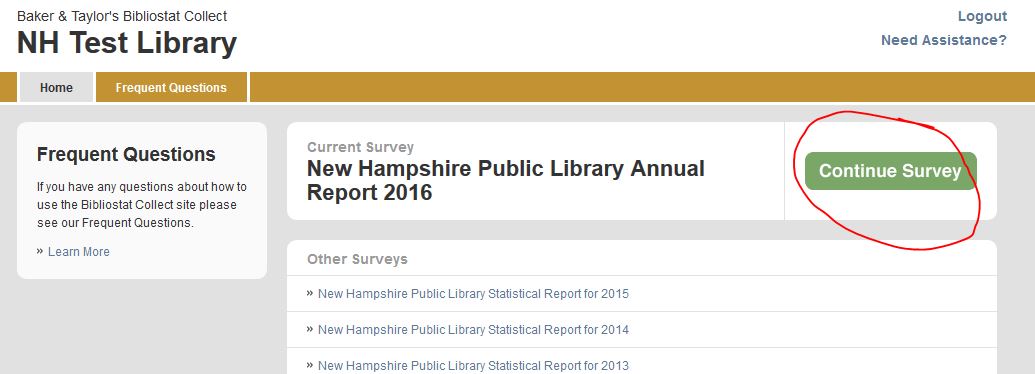
Click image to enlarge any screenshot.
- Click the blue number preceding any question to view a pop-up definition.
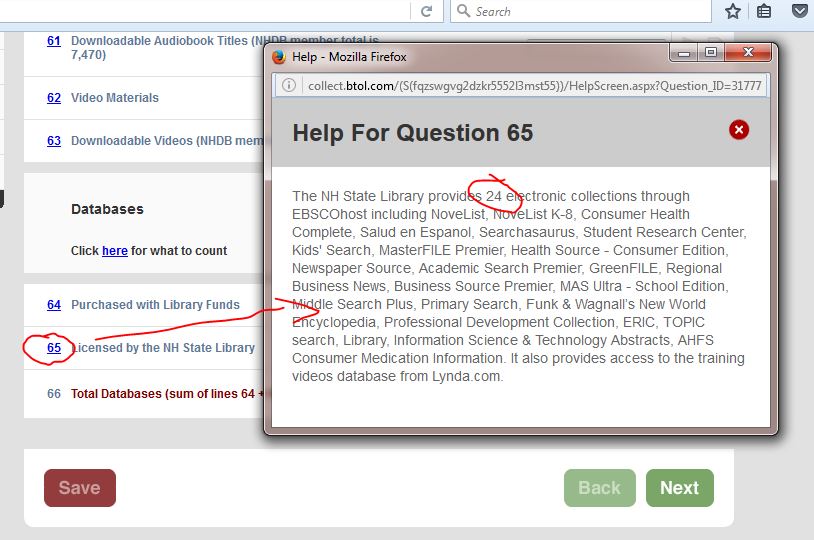
- Note that some hints bring you to online spreadsheets where you can quickly check your NHDB or database usage for the year. Always look at the bottom of the spreadsheet for multiple sheets of data. Note that if your library subscribes to other qualifying services/databases, you will need to find additional statistics.

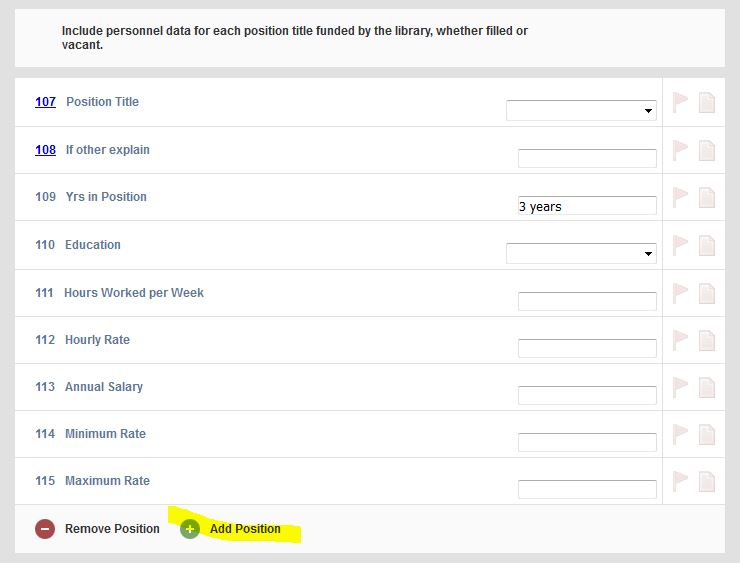
- When submitting multiple sets of data, click on the “+ Add Person, etc.” Click “- Remove Person” to delete a data set.
- Edit checks are generated by the U.S. Census Bureau when a response is substantially different from the previous year or a response is not consistent with other data submitted.
- Edit Checks require entering text in the text box. Click on the “Edit Check” tab. Type explanation in the text box provided and click on “Submit Corrections.”
- Unanswered questions require data before the survey will submit.
- A successful submission generates a “Congratulations” message.
Notes
Your login is not cap-sensitive. Make sure you are using six characters for your username and seven characters for your password. Contact the reference desk (271-2144) for your login information.
Notes (in general): Generally speaking, we NEED your notes. Whenever there is a decrease or increase in circulation, attendance, budget, etc. of more than 15%, please leave a note explaining why. (This can be as simple as saying that you are borrowing toys and holding more children’s programs — or weeding the collection helped increase your circulation, etc.)
Question 20: FSCS
Some libraries that had successfully entered “N/A” for the following questions in the past are now unable to fully submit the survey due to an error with Question 20: Does your library meet the federal definition criteria of a public library? If you receive an error or edit check or if you are unable to submit the survey due to any error with Question 20, please review the following questions and estimate an answer for these questions:
- Question 46: Reference Transactions
- Question 57: Print Materials
- Question 72: Total Physical Item Circulation
- And questions pertaining to budget items: 72-97
Questions 33-45: Branch Libraries
These questions can be left blank for libraries that do not have branches. (There are only 5 libraries in the state that have a branch library.)
Question 61: Copies of Downloadable Audiobooks and Downloadable Music
This question has been rewritten to better fit the federal data element #453. This question should include all downloadable electronic files on which sounds are recorded and can be played back. This includes both digital audiobooks and digital music files.
Libraries that only participate in NH Downloadable Books will have a total of 14,889 audiobook copies. (Yes, this is higher than previous years, as only unique titles were erroneously counted.) Libraries that provide Hoopla to their patrons will include Hoopla music and audiobooks “collection sizes” to this number. However, since the Hoopla collection size is HUGE and your patrons really only use a fraction of the collection, we have to count the collection differently. Please do not add the number of possible choices in the Hoopla collection, instead…
Think of Hoopla as a giant department store where the library has a line of credit. Library patrons are allowed to visit the store and buy what they want on the library’s credit — aka patron-initiated collection development. Your “collection size” is the same as the number of checkouts.
1 Hoopla circulation = 1 Hoopla collection item
If patrons checked out 50 Hoopla audiobooks, the circulation of digital audiobooks increases by 50 (Question 68) and the digital audio collection size increases by 50 (Question 61).
If patrons checked out 100 Hoopla songs (music), the circulation of digital music increases by 100 (Question 68c) and the digital audio collection size increases by 100 (Question 61).
So why are music and audiobook collection sizes added together in Question 61 and, but reported separately (Question 68 and Question 68c) for circulation? Well, truthfully, the electronic usage statistics are a new federal data element and only collects a combined electronic usage total. (We break it up into audiobooks, music, video, eBooks, etc. for our own sanity.) However, the collection statistics are broken out into print, eBooks, audio_physical, audio_downloadable, video_physical, video_downloadable data elements.
Question 65: Databases Licensed by the State Library
The default number is being changed from 24 to 22. We “lost” Searchasaurus, Primary Search, and Student Resource Center from EBSCO this year. NoveList Plus and NoveList K-8 Plus had not previously been counted. (A total count brings the number to 22.)
Question 68b & Question 68c: Downloadable or Streaming Video or Music Circulation
Due to additional federal questions about electronic material usage, these questions were added. I think this will be mostly used by libraries that offer Hoopla to their patrons. Please contact the vendor to ask about Hoopla circulation.
Question 70: Total Use of All Databases
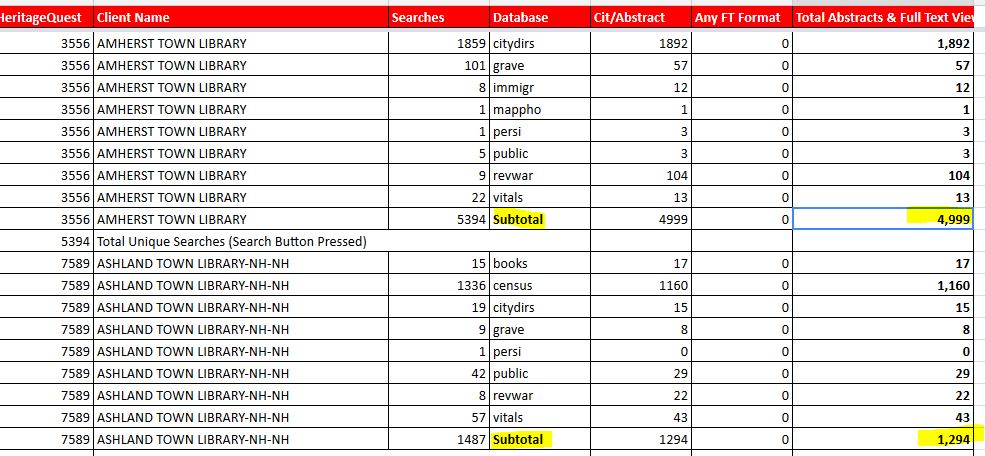
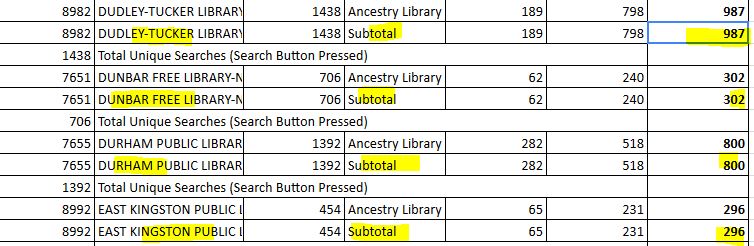
Please look to the bottom of the linked spreadsheet to find EBSCO, Ancestry LE, and HeritageQuest Online statistics (in different sheets). Please use the total full text and abstracts for EBSCO, as a vast majority of your abstract views will be important NoveList records.
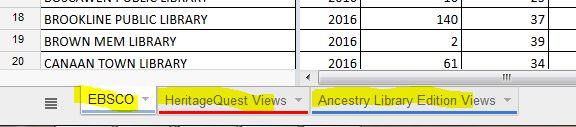
Ancestry Library Edition and HeritageQuest Online will show multiple lines for one library. Look for the SUBTOTAL line for the column of full text and abstracts. Note that each library will have more than one line of statistics. Look for the SUBTOTAL line.
Question 89: Employee Salaries & Wages
This hint comes from a librarian mentor. If there was a gap between one staff member leaving and another person being hired, leaving the position vacant for a period of time: Please use the amount budgeted for the position. If a staff member left mid-year and the position was discontinued and will never be filled, please use the amount of funds spent and leave a note in the survey question.
Please add all library employees as a “position.” Additional staff members (other than the director) are, admittedly, not federal data elements, but this information is enormously helpful to your fellow NH librarians.
Good luck and let us know if you have any questions!