
EBSCO has refreshed their reporting tools within the EBSCOAdmin site.
The site is accessed from http://eadmin.ebscohost.com/ The account passwords expire yearly, so do not be surprised if you must reset your password. If you do not know your login information, please contact me and I will push the login information and a password-reset to your desired email address.
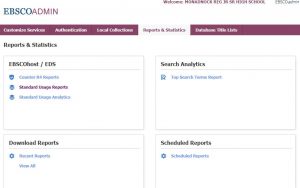
Once logged into the site, click on Standard Usage Reports.
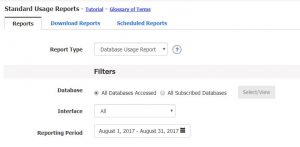
Next, select the Database Usage Report, which databases you want to run statistics on (all or just specific databases), and pick a reporting period.
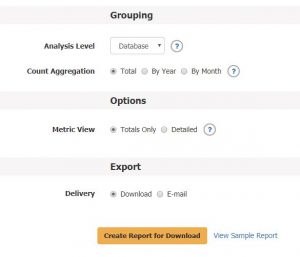
Next, since you are running a report on one library or school at a time, you will want to view the report on the “Database” analysis level. Decide if receiving the statistics by month, calendar year, or for the entire time period is most useful to you and create the report for download.
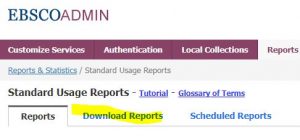
Note that if you select “Download” (and not “Email”) you will need to click on the “Download Reports” tab. Then download the report in Excel format as normal.
It is also possible to set up a scheduled report. This is accomplished by selecting Export >> Delivery >> Email >> Email Frequency >> Monthly (dropdown). Be sure to select the “Email Report” option.