
New Google Authentication for the EBSCO Databases (October 2018)
Quick Takeaway
There is a large “Sign in with Google” image/link on the login screen. According to the rep, this will always appear to your users when they log into the site; however, it cannot always be used. Let’s learn more…
Getting into the Weeds
You might have seen this scenario before: When you visit a website and instead of signing into, say…, Trip Advisor, you have the option to sign into Trip Advisor using your Google or Facebook account information. Now, it’s not that Trip Advisor will store your Google login; instead, it is more like a layer or a plugin that resides on the periphery of the Trip Advisor site that uses your Google (or Facebook) login to create an account for you. Well, that is sort-of how this Google authentication works with EBSCO with a couple of differences. Read on.
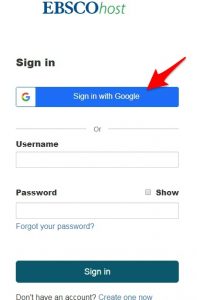
If the user is already signed into Google, they will select their account…
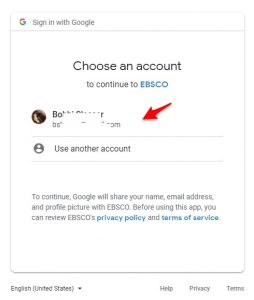
- While anyone can create a Trip Advisor account, not everyone has access to EBSCO. So, if a patron/student is not authenticated into EBSCO they cannot just create a Google login for EBSCO. Well, they can click on the Google login, but they get a confusing error: Authentication Error Code 134.
- Instead, users must be pre-authenticated via IP authentication (like on the library/school network) or by signing into the town/school username/ password and then create a new MyEBSCOhost account to use later. They will be prompted to enter their Google credentials at that point.
- Once logged into EBSCO either through IP/username/barcode authentication, they can click on “Sign In” in the upper right corner of most databases. (This admittedly seems counter-intuative since they are already signed in…) But this is the only way to link the accounts.
Turning on the Google Authentication at the Library Level
At this moment, Google authentication is turned off for most libraries (who have not yet requested it be turned on). The rep recommended that the authentication be turned on by default and allowing libraries/schools to opt out by contacting tech support.
My Thoughts
As many of you with Google accounts know, it is nice to get automatically authenticated directly into a site. This would do that for our users once it is set up properly by the vendor (by turning on our accounts) and by the patron (when they create their new MyEBSCOhost account). The Google authentication will not last indefinitely, as users will need to verify their accounts at least yearly by logging in via IP or username/password authentication.
Here is what EBSCO’s FAQs have to say about the user benefits:
Benefits of signing in with your Google account
- You don’t need to remember additional credentials to access your personal My EBSCOhost
- EBSCO recognizes you by the same credentials as your institution does.
- Once you are signed in using Google, you can seamlessly authenticate and personalize using the same Google credentials.
- You can access EBSCO resources more securely because EBSCO does not store Google usernames and passwords.
https://help.ebsco.com/interfaces/EBSCO_Guides/Google_Apps_for_Education/Google_Sign_In_FAQS
What EBSCO knows about the users
When the patron creates a new MyEBSCOhost account – which is how they create their Google authentication login – their email address, name, and profile picture are saved, as well as:
- Account information, such as login credentials, email, and name.
- Saved items, such as checkouts and save searches
- Activity data, such as searches, retrievals, and link outs.
- Other data, such as affiliations and continuing education.
(Taken from the very tiny screenshot below. My lightbox has failed and needs fixing…)
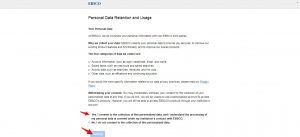
At odds with EBSCO’s statement about saving “login credentials” is the information provided on the Google app permissions page, EBSCO only has access to basic account information (profile information and email address).
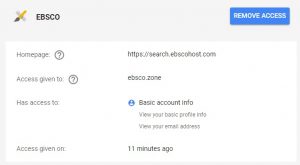
I am not sure if or how “login credentials” are saved. (The rep showing me all of this did not know either… I am going to keep looking into this.)
It is possible, however, to revoke access from your Google account, if desired.
https://myaccount.google.com/permissions