
As New Hampshire moves forward with the DPLA project, libraries with existing collections may be wondering how to integrate their existing collections into future collections or new platforms.
The ability to move collections comes down to three simple things:
- Having a digital object (image, PDF, etc.)
- Having the information about the object
- Properly identifying the digital object within the information about the the object
To get into more detail, let’s look at each bullet point a little closer:
The Digital Object
It is important that the file — typically a scan of a old photograph or of a paper document — has been digitized at or above the minimum standards designated by the NH Digital Library and is available in the correct format.
Metadata
Metadata describes the digital objects. Examples of metadata include its title, description, creator, etc.
Linking the Digital Object within the Metadata
Finally, for a successful transfer from one digital platform to another, it is important that the unique file name of each object and its stored location is clearly provided.
Testing the Moves
Moving from two instances of the same digital platform (e.g. WordPress to WordPress or Omeka Classic to Omeka Classic or Omeka S) is typically simple and built into the core functionality of the software or easily added by installing a plugin. For instance, Omeka uses a built-in API to easily move the digital objects and the associated metadata from one site to another, allowing the user to “map” the existing metadata from the first site to the new metadata used in the second site.
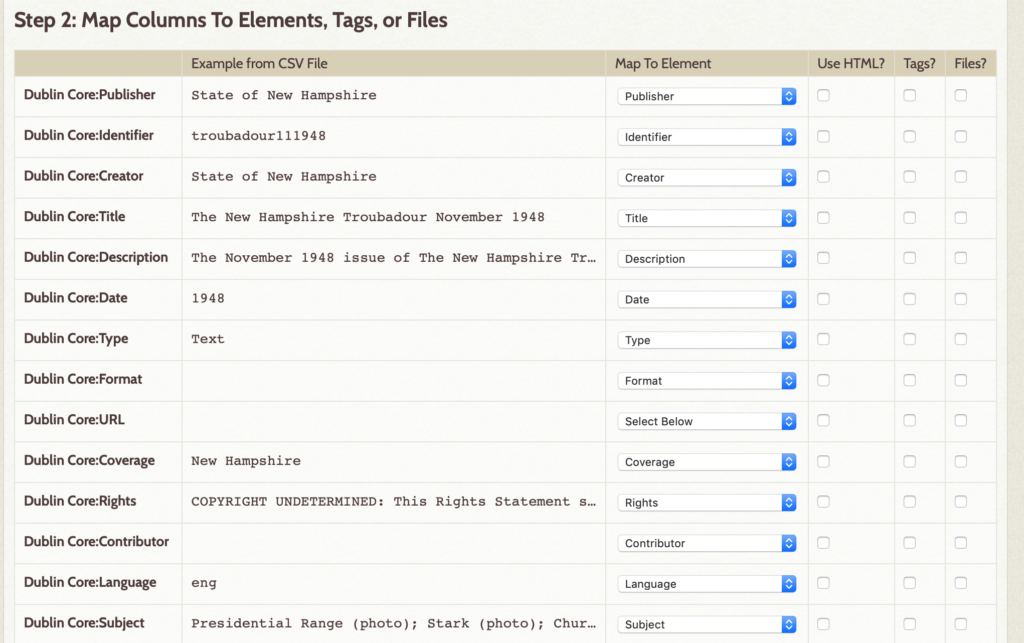
For the times when you will want to move your items to a new platform, it all comes down to a simple spreadsheet. If you collected your data on a spreadsheet, you may need to revise your column headings and review your data to ensure that it is compatible with the new platform’s metadata requirements. Additionally, you may need to make changes to the information pertaining to where the digital objects are stored (or need to be stored) for transferring them to the new platform. If you do not have a backup of your metadata in spreadsheet (.csv) format, you will need to export the data from your current platform, review the metadata, update column headings, etc. before importing in the data.
In Summary
While there is a learning curve to the process, as long as you have or are able to extract metadata and tie that information to the correct digital object, you have what you need to successfully join or create a new digital library.
My Notes
I recently received access to trial a new platform, Hyku UP, and was able to quickly make alterations to a small collection of digital objects and their associated metadata used on an Omeka project to populate the site through a CSV import. The images (jpg) uploaded perfectly, but the Hyku UP site does not embed PDFs.
From there, I started wondering if I could grab the digital items from a WordPress site and bring them into an Omeka site. Yes! A WordPress plugin made the export to .csv easy. Additionally, I reran Omeka API exports/imports (from Omeka to Omeka). It worked really well for small collections. (I have yet to try importing from a large collection.) I was even able to install the OAI-PMH plugins on two Omeka sites. The metadata populated new item records, but the digital objects failed to transfer. (It is unknown if this was user error or if the plugin failed to work properly.)
The major missing piece to the import/export issue is a CSV export from Omeka Classic. Two different plugins were attempted and neither worked. It is not possible to export from Omeka S. It must be possible, as the OAI harvester is pulling the data and the link to the object…